Start with deployment exposure, not protocol purity
Pick the security profile that matches your deployment's exposure and your team's ability to run certificate operations, not the highest number a datasheet advertises. Profile choice is a rollout decision first and a protocol checkbox second.
Across the OCPP integrations I've worked on, the teams that struggle most are the ones that picked Profile 2 or 3 to satisfy a procurement line, then discovered they had no process to renew or revoke certificates at fleet scale. The protocol was "supported" and the deployment was still fragile.
Most teams begin with the wrong question:
Which security profile does the charger support?
The more useful question is:
What level of exposure does this deployment have, and what operational process do we have to keep certificates, firmware, and charger identity under control?
That is what should drive profile selection:
- private lab or tightly controlled fleet site
- public charger network
- payment-sensitive or compliance-sensitive environment
- firmware distribution risk
- internal ability to run PKI operations safely
Security profile choice is therefore part of rollout design, not just protocol compliance.
Why EV charging security matters
A charger is a network-connected device that controls real electricity and touches payment data, so a compromise is an energy, safety, and data problem at once. Security profiles exist to give that device a verifiable identity and a trusted channel back to your CSMS.
Concretely, a compromised charger can:
- Steal energy — unauthorized sessions at your expense
- Exfiltrate data — session data, user tokens, payment information
- Cause safety hazards — malicious firmware could override safety limits
- Pivot into your network — a charger on your LAN is an attack surface
Yet most EV charging deployments run with minimal security. Many chargers still communicate over unencrypted WebSocket connections with no authentication.
What are the three OCPP security profiles?
The Open Charge Alliance defines the same three security profiles in the OCPP 1.6 Security Whitepaper (edition 2) and in OCPP 2.0.1. They are transport and authentication levels — not a ladder that ends in signed firmware:
- Profile 1 — Unsecured transport with HTTP Basic Authentication
- Profile 2 — TLS with HTTP Basic Authentication
- Profile 3 — TLS with client-side certificates (mutual TLS)
Signed firmware is a separate capability (for example SignedUpdateFirmware under the 1.6 security extension, and firmware management in 2.0.1). Teams often deploy it alongside Profile 3, but it is not what Profile 3 means in the specification.
The table below matches the OCA profile names.
| Profile | Official name | Transport | Charge Point auth | CSMS auth | Typical fit |
|---|---|---|---|---|---|
| Profile 1 | Unsecured Transport with Basic Authentication | ws:// (no TLS) | HTTP Basic (username + password) | None | Labs, or tightly controlled networks (e.g. VPN) only |
| Profile 2 | TLS with Basic Authentication | wss:// | HTTP Basic | Server TLS certificate | Private fleets that need encryption without full charger PKI |
| Profile 3 | TLS with Client Side Certificates | wss:// | Client X.509 certificate | Server TLS certificate | Public networks, payment- and compliance-sensitive deployments |
Core OCPP 1.6 did not mandate these profiles; many fleets still run plain WebSocket or ad-hoc Basic Auth. The whitepaper adds them for 1.6-J; 2.0.1 makes the same model first-class in the core specification.
Security Profile 1: Unsecured transport with Basic Authentication
The lowest option. The Charge Point authenticates with HTTP Basic credentials over unencrypted WebSocket.
How it works:
- Charger opens a plain
ws://connection to the Central System / CSMS - Charger sends credentials in the WebSocket handshake (HTTP Basic Auth)
- The CSMS validates credentials and accepts or rejects the connection
When to use it: Only on trusted networks (lab, or a site already isolated by VPN / private APN). The OCA guidance is that field operation should use a TLS profile.
Limitations: No transport encryption and no CSMS authentication. Credentials and all OCPP traffic can be read or modified on the path. Not a production field default in 2026.
Security Profile 2: TLS with Basic Authentication
The communication channel is encrypted with TLS. The Charge Point still authenticates with HTTP Basic credentials; the CSMS authenticates with its server certificate.
How it works:
- Charger establishes a TLS connection (
wss://) and validates the CSMS server certificate - Charger sends HTTP Basic credentials in the WebSocket handshake
- The CSMS validates credentials and accepts or rejects the connection
When to use it: Production fleets that need encryption and a shared secret per charger, but are not ready for full client-certificate operations.
Limitations: Identity still rests on a password (the AuthorizationKey). Anyone who steals that secret can impersonate the charger. There is still no mutual certificate-based identity for the Charge Point.
Security Profile 3: TLS with client-side certificates (mTLS)
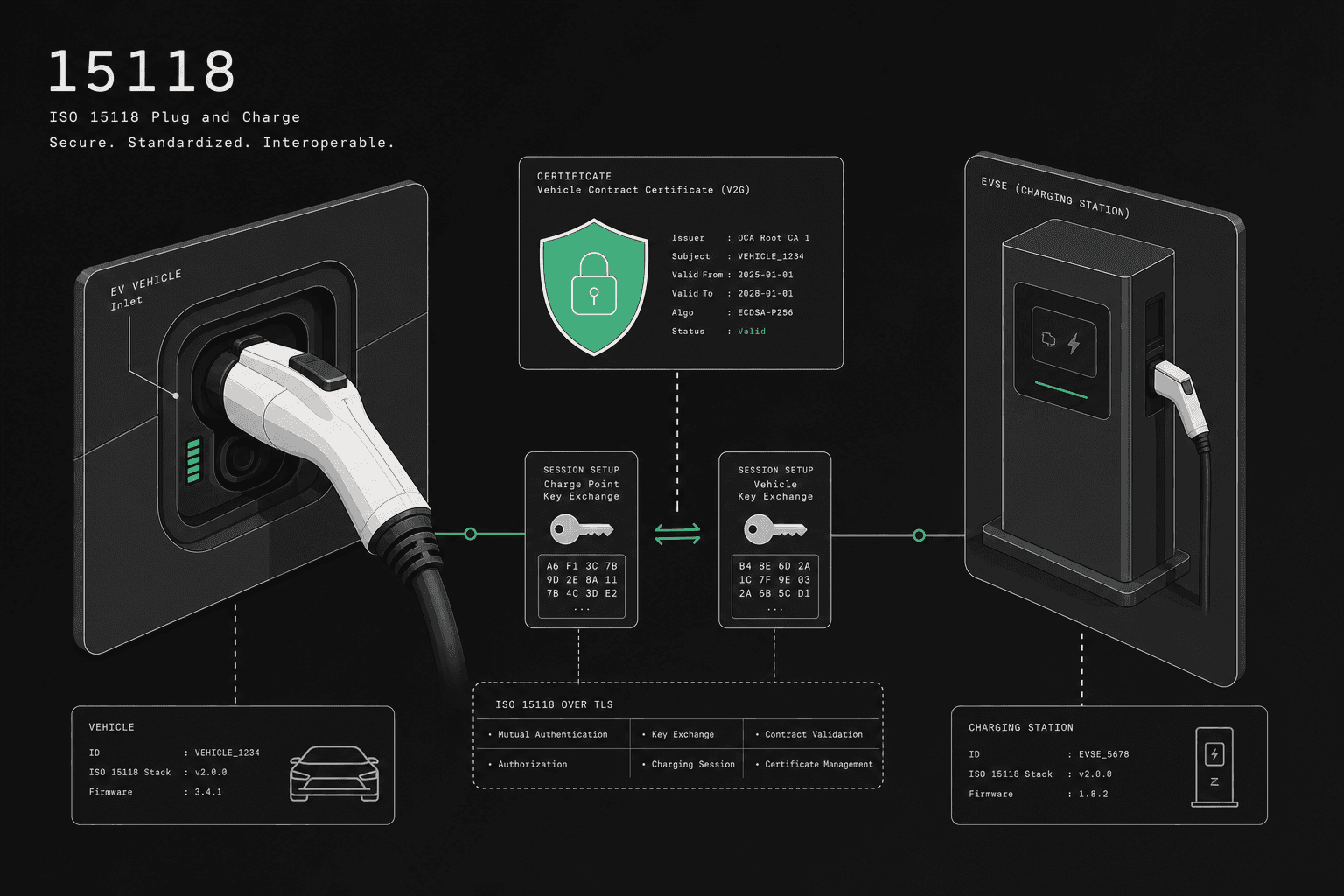
Both the charger and CSMS authenticate each other with X.509 certificates. This is mutual TLS (mTLS) — the usual target for public-facing networks.
How it works:
- The CSMS presents its server certificate (standard TLS)
- Charger presents its client certificate
- Both sides verify each other's certificate chain against a trusted CA
- Connection established only if both certificates are valid
When to use it: Public-facing deployments, payment-sensitive sites, and any environment where charger identity must not reduce to a shared password.
Why it matters: A stolen password lets an attacker impersonate a charger. A stolen certificate is useless without the corresponding private key, which should stay in the charger's secure element.
Signed firmware (separate from the profile enum)
Cryptographic verification of firmware packages is not Security Profile 3. It is an additional control set: signed images, trust anchors for the signing key, and on-device verification before install.
How it works:
- Firmware packages are signed by the manufacturer or operator
- Before installing, the charger verifies the signature against a trusted key
- Unsigned or tampered firmware is rejected
When to use it: Critical infrastructure and chargers with payment terminals — typically after Profile 3 (or at least Profile 2) is stable in production.
Managing certificates at scale
The hard part of Profile 3 is not the TLS handshake, which is solved the moment a connection succeeds in the lab. The real work is the certificate lifecycle: issuing, distributing, monitoring, renewing, and revoking thousands of charger identities without taking the fleet offline.
In mixed-fleet rollouts I've seen, this is reliably where the cracks appear. A single vendor model handles enrollment one way, another expects a pre-loaded certificate, and a third silently ignores renewal messages. The protocol looks identical on paper; the operational reality is anything but. Treat certificate operations as a first-class system, not a deployment afterthought.
Certificate lifecycle
Every certificate has a lifecycle:
- Issuance — generate a key pair, create a CSR, sign the certificate
- Distribution — install the certificate on the charger
- Monitoring — track expiry dates across your fleet
- Renewal — issue new certificates before old ones expire
- Revocation — invalidate compromised certificates immediately
At 10 chargers, you can manage this manually. At 1,000, you need automation.
Certificate hierarchy
A typical EV charging PKI looks like this:
Root CA (offline, air-gapped)
├── Intermediate CA (CSMS)
│   ├── Central System certificate
│   └── Charger certificates (one per station)
└── Intermediate CA (Manufacturer)
    └── Firmware signing certificate
The root CA should never be online. All day-to-day operations use intermediate CAs.
OCPP certificate messages
Certificate lifecycle messages appear in the OCPP 1.6 Security Whitepaper and as first-class operations in OCPP 2.0.1:
InstallCertificate— install a CA certificate on the chargerGetInstalledCertificateIds— list certificates installed on the chargerDeleteCertificate— remove a certificate from the chargerSignCertificate/CertificateSigned— charger-initiated certificate renewal via CSR
The most common OCPP security mistakes
The recurring failures in secure OCPP deployments are operational, not cryptographic: plaintext transport, unmanaged certificate expiry, private keys baked into firmware, and no revocation path. Each one is avoidable, and each one tends to surface only under production load or during an incident.
Staying on Profile 1 (plain ws://) in the field. Always move production fleets to at least Profile 2 (wss://). Profile 1 is for trusted networks only.
Confusing Profile 2 with mTLS. Profile 2 is TLS plus a password. Mutual TLS is Profile 3. Procurement language should use the OCA names so vendors and CSMS settings match.
Treating signed firmware as "Profile 3". Profile 3 is client certificates. Firmware signing is a separate control you add when image integrity is in scope.
Using self-signed certificates without pinning. Self-signed certificates are fine for development but require certificate pinning in production to prevent MITM attacks.
Not rotating certificates before expiry. An expired certificate takes your entire fleet offline. Set up automated renewal with a 30-day lead time.
Storing private keys in firmware images. The private key should be generated on the charger and never leave it. Use a CSR-based enrollment flow.
Ignoring revocation. When a charger is decommissioned or compromised, its certificate must be revoked. Implement CRL (Certificate Revocation List) or OCSP (Online Certificate Status Protocol) checking.
What does a realistic secure rollout sequence look like?
Stage the rollout so each layer is proven before the next is added: leave unsecured Profile 1, encrypt with Profile 2, introduce charger certificates under Profile 3 on a controlled segment, automate renewal, then add firmware signing. The order matters because a later layer that fails on an unproven earlier one is far harder to diagnose.
For most serious deployments, the safest sequence looks like this:
- Leave Profile 1 Stop running field chargers on plain WebSocket. Profile 1 stays for lab or VPN-only sites.
- Standardize Profile 2
Move fleets to
wss://with server certificate validation and Basic Auth. Prove connectivity and password rotation first. - Introduce Profile 3 (client certificates) Roll out charger identity with mTLS on a controlled hardware segment.
- Automate renewal and expiry monitoring Do not scale mTLS fleet-wide until renewals and alerts are proven.
- Add signed firmware controls Only then add on-device firmware verification for critical fleets — as a separate workstream from the security profile number.
This is slower than a checkbox rollout, but much safer operationally.
Which controls are non-negotiable before production?
A secure OCPP deployment is production-ready only when the certificate operations are documented, tested, and owned, not just configured. The checklist below is the bar I use before signing off a profile rollout, because every item maps to a failure mode that has taken fleets offline elsewhere.
Before you call a secure OCPP deployment production-ready, verify:
- production traffic is at least Profile 2 (TLS), not Profile 1
- a documented certificate issuance flow if Profile 3 is in scope
- renewal alerts with lead time
- revocation procedure tested on a real charger
- incident runbook for expired or compromised certificates
- separation of root and intermediate CA responsibilities
- firmware signing and verification tested end to end if image integrity is in scope
If one of those is missing, the protocol may be configured correctly while the deployment is still fragile.
What should certificate automation in a CSMS provide?
When you evaluate a CSMS for secure OCPP, judge its certificate operations, not its profile checkbox. The platform should remove manual PKI work while keeping the controls auditable, so your team owns policy and the system handles the mechanics at fleet scale.
In practice, the capabilities worth confirming are concrete:
- Automated CA — issue and manage charger certificates without hand-rolling OpenSSL commands per station
- Expiry monitoring — alerts with lead time before certificates expire, across the whole fleet
- CSR-based enrollment — chargers generate their own key pairs so private keys never leave the device
- Fast revocation — invalidate a compromised or decommissioned charger's certificate immediately
- Firmware signing — sign and distribute firmware with on-device integrity verification when that control is required
These are the same controls we built into GridOS after watching manual PKI processes slow secure rollouts down, but the checklist applies to any platform you assess.
What is the next step for rollout teams?
Start from exposure: leave Profile 1 off field networks, use Profile 2 as the encrypted baseline, and target Profile 3 (mTLS) for public or payment-sensitive fleets. Prove certificate renewal and revocation before scaling. Plan signed firmware only after the connection profile is stable. The profile number is the easy decision; the operations around it are the real project.
If security profile selection is active in your deployment, continue with:
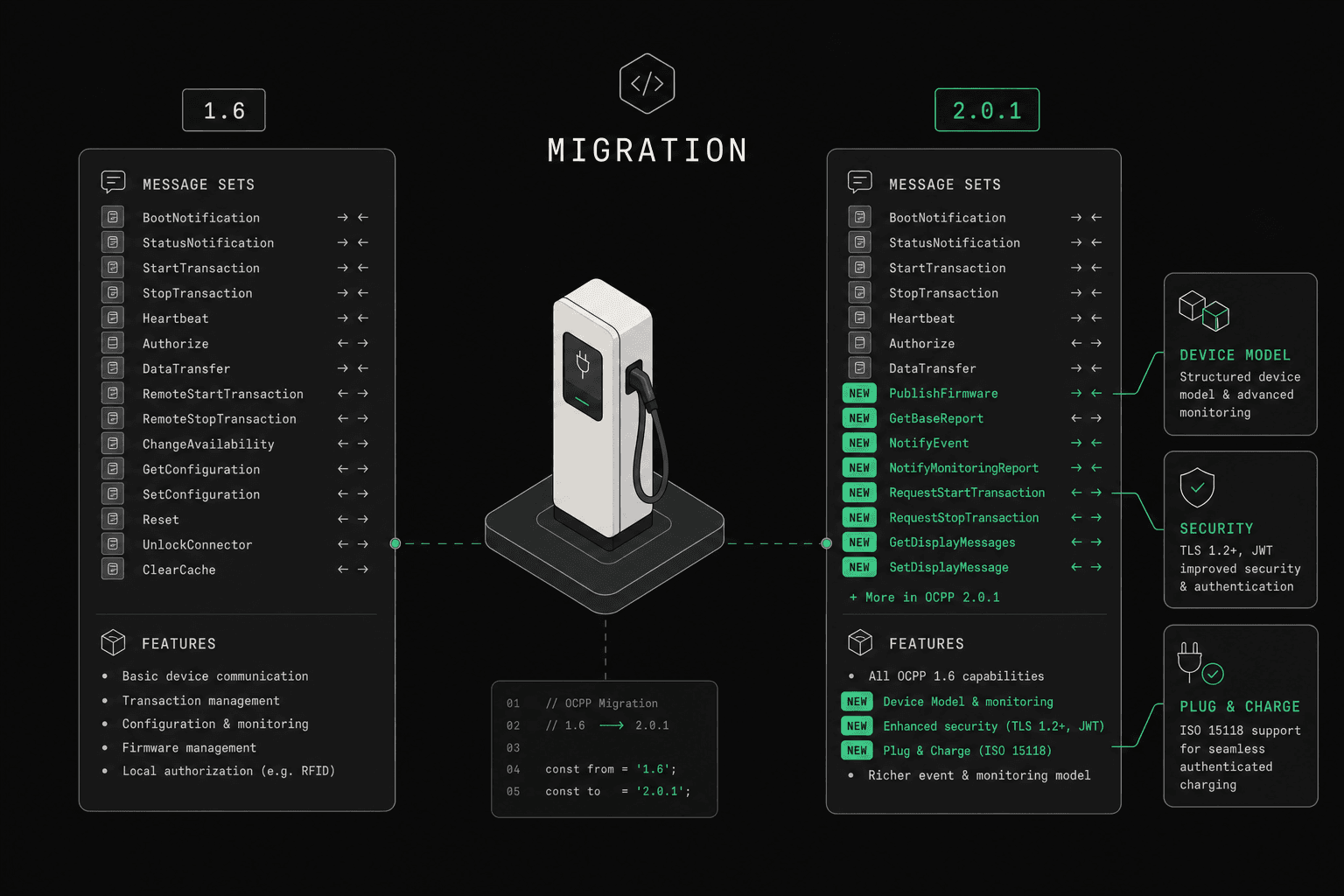
- OCPP 1.6 to 2.0.1 migration guide if certificate rollout is part of a protocol transition.
- How to evaluate an OCPP platform if you need to score vendor security operations, not just feature claims.
- Talk to our team if you need help with certificate operations, mTLS rollout, or charger identity architecture.
For a deeper protocol reference, see the OCPP 2.0.1 deep dive.